|
|
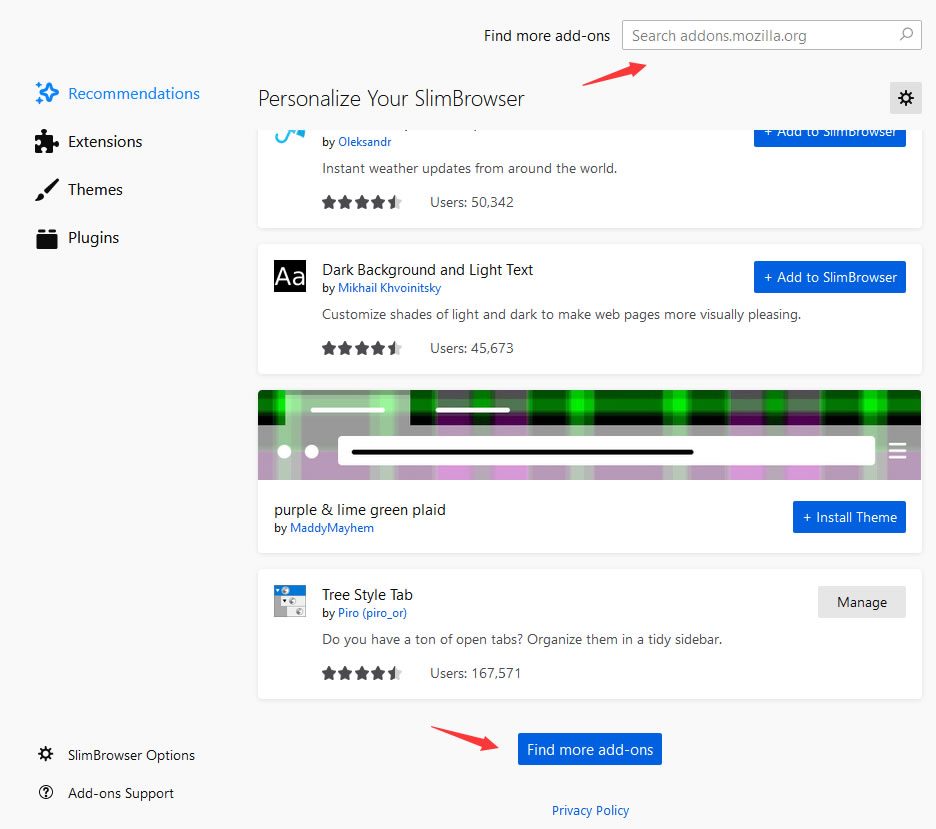
Installing Themes and Extensions in SlimBrowserSlimBrowser integrates the most useful and popular features directly into the browser so that you don't install any external extensions in most of the cases. In case you do need to resort to external extensions for additional functionality, you can install any extensions from the Mozilla Add-on Website. Other than extensions, you can install themes from the same website as well. Both themes and extenions are treated as add-ons in SlimBrowser. To install or manage add-ons in SlimBrowser, select "Add-ons" from the main menu and you will arrive the following screen:
You can install any of the recommended add-ons or themes. You can use the search box at the top to search for add-ons by name. You can click the "Find more add-ons" to visit the Mozilla add-on website.
|
| Product | Download | Support | Business Relations |
| What's New Full Feature List Awards & Honors Demonstration Videos Screenshots |
Web Browser Download Skin Download Plugin Download |
Online Manual FAQ Online Feedback Online Forum |
Press Releases Affiliate Program Business Opportunities Company Info Contact Us |
English | Español | Français | Deutsch | Português | Italiano | Nederlandse | Svenska | Magyar | Română | Русский | Polski | 简体 | 繁体 | 日本語 | 한국어
Misc Links
| Internet Explorer Engine | Fastest Web Browser | Slimjet Web Browser | 中文视频 |
Copyright© 2024 FlashPeak Inc. All rights reserved


 English